Stack Matrix Hub (11)
Hardening Nextcloud AIO Mastercontainer & Loopback Bindings
Lock AIO admin UI (:8080) to localhost SSH tunnels, bind Apache to 127.0.0.1:11000, and isolate Docker socket access.
127.0.0.1:8080 · UFW Deny 11000 · Rootless / Socket RO
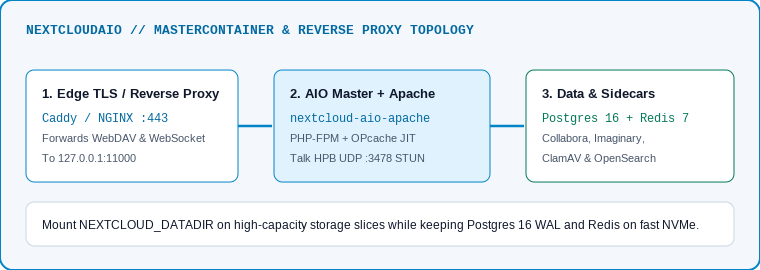
Never Expose Port 8080 or 11000 on Public Interfaces
The Nextcloud AIO mastercontainer mounts /var/run/docker.sock:ro to orchestrate sibling containers. Binding ports 8080 (AIO setup UI) and 11000 (Apache backend) strictly to 127.0.0.1 ensures zero direct internet exposure.
Administering AIO Over SSH Local Port Forwarding
Open the AIO management console only via ssh -L 8080:127.0.0.1:8080 user@server, while allowing public inbound traffic exclusively on TCP 80/443 (Caddy/NGINX) and TCP/UDP 3478 (Talk TURN).
Measured Thresholds & Configuration
| Service Port | Bind Interface | Firewall Policy | Access Method |
|---|---|---|---|
| 8080 (AIO Admin UI) | 127.0.0.1 | Block externally | SSH tunnel (-L 8080) |
| 11000 (Apache Backend) | 127.0.0.1 | Block externally | Local Caddy/NGINX proxy |
| 443 (HTTPS) / 3478 (Talk) | 0.0.0.0 | Allow public | TLS 1.3 + WebRTC TURN |